DO YOU WANT TO WIN the Xbox X-BITE?
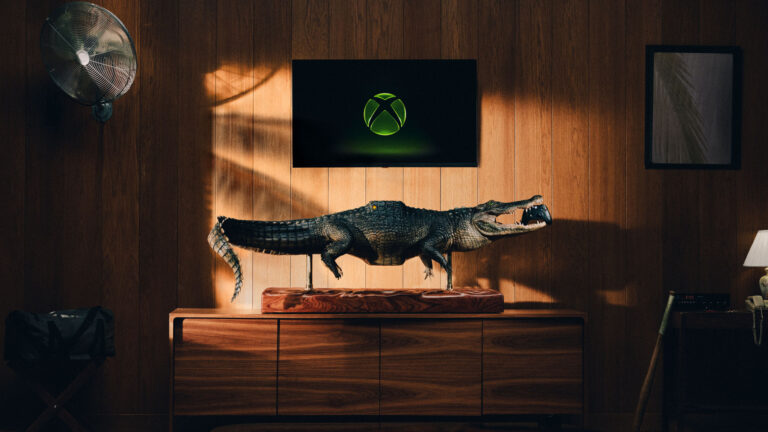
One custom Xbox console and controller bundle. Up to three social entries, one on each eligible platform.
Giveaway details + how to enter
Gaming Room Planning: Console Space, Displays and Costs
- Prize
- One custom Xbox Series X console and controller bundle inside a five-foot fabricated alligator. ARV $799.99.
- Ends
- November 11, 2026 at 2:59 AM ET
Plan a gaming room around the equipment, connections and household budget it needs. Compare screen choices, recurring services and practical storage before adding a large console installation.
Affiliate disclosure: Freebie Mom may earn a commission through the optional signup links on this page, at no extra cost to you. Those programs are separate from this giveaway.
Design the gaming area around the equipment you will use
A gaming area works best when its furniture and equipment fit the actual room. Start with the console, screen and accessories you already own or plan to obtain. Record their dimensions and the space required for ventilation and connections. A large decorative installation needs a different layout from an ordinary console on a shelf. Plan the room around safe access and everyday use rather than a promotional photograph.
Measure the wall, furniture and walking space. Include doors, drawers and the path used to bring equipment into the room. Check whether a stand can support the intended load according to its manufacturer. Keep access to outlets, switches and connections practical. A unit that fits on the surface may still be unsuitable if its cables are bent sharply or its ventilation openings are blocked.
Make a list of essential items and optional additions. The first group may include a compatible display, a stable surface and necessary cables. Extra controllers, accent lighting and decorative pieces belong in a separate group. Assign a spending limit to each category so a visually appealing accessory does not consume money needed for a basic connection or support item.
Think about other people using the room. Shared living areas may need a way to put controllers away, reduce clutter and keep a clear route through the space. Decide how the setup will work when no one is gaming. A room plan that supports both play and ordinary household use is often more practical than building a display that occupies every available surface.
Compare displays and connectivity without buying twice
Choose a screen using the functions you can actually use. Check resolution, refresh rate, available inputs and the compatibility requirements of the console and games. A marketing label on a television does not establish that every port supports every feature. Read the exact model's specifications and connection instructions. Save the model number so comparisons refer to the same product.
Review viewing distance and the size of the room before choosing a larger display. Consider how the screen will be used for other entertainment and whether everyone can see it comfortably. If mounting it, follow the mount and display manufacturers' requirements and use qualified help when needed. Do not assume an existing bracket fits merely because the screen dimensions appear similar.
List the devices that need simultaneous connections. A console, streaming device, sound system and other equipment can require more ports than expected. Check whether an adapter or switch supports the relevant features before buying it. Avoid replacing several items to solve a connection issue that could be addressed by reading the correct setup instructions.
For internet access, compare the connection options available in your room. The service advertised by your provider is only one part of the experience; local equipment, Wi-Fi conditions and other household activity can matter. Keep network account details secure and obtain updates through official channels. Before paying for a different plan, identify the actual limitation and ask the provider about the total recurring cost.
Account for electricity, subscriptions and replacement items
The console's initial price does not include every ongoing expense. List game purchases, memberships, downloadable content, storage and optional services. Check which features require a recurring subscription and which are available without one. An introductory offer may renew at another price. Put renewal dates on a calendar and keep the cancellation route with the account information.
Estimate electricity for the whole setup, including the display and any audio equipment. Use measured consumption or appropriate documentation rather than assuming a power supply's maximum rating equals normal usage. Electricity cost is based on kilowatts multiplied by hours and the price per kilowatt-hour. Use your own utility rate and realistic hours. A rough estimate can help compare settings without pretending to predict every bill precisely.
Include items that wear out or go missing, such as compatible charging cables, batteries and controller accessories. Check the manufacturer's requirements before substituting a charger. Store small parts together and label shared equipment. A simple routine for charging and putting items away can prevent repeated replacement purchases that were never included in the original room budget.
Review return and warranty terms for each major item. Save receipts and serial numbers, and understand who handles a repair. A protection plan is a separate product with its own limits; compare it with the coverage already included. Keep the equipment records accessible outside the gaming system so you can find them if the device fails or cannot connect.
Finish the setup with a practical household routine
Route cables so they remain accessible without crossing the main walking area. Follow the device and furniture instructions for ventilation and placement. Keep liquids and other hazards away from electronics. If the installation is unusually large or heavy, confirm the assembly and handling requirements before moving it. A decorative object that contains electronics should be treated according to its specific instructions, not as ordinary furniture.
Set up individual household accounts where appropriate and review available family settings. Use strong account security and keep recovery information safe. Decide who can approve purchases and how shared subscriptions will be managed. Clear household rules can prevent unexpected spending more effectively than discovering an unfamiliar charge after a statement arrives.
Optional survey and shopping-reward programs can help with a planned accessory purchase after rewards are actually redeemed. Check whether the reward is usable at the store you intend to use and confirm any email-verification step. Qualification and delivery vary. Keep affiliate program participation separate from game purchases and sponsor promotions; joining a panel does not reserve a console or enter an unrelated drawing.
After using the room for a few weeks, review what is awkward or unused. Adjust the arrangement within the manufacturers' guidance before buying more equipment. Note actual subscription use and any accessories you still need. A useful gaming room is one you can enjoy, maintain and afford over time, with the complete cost visible instead of hidden among small recurring payments and impulse upgrades.
Xbox Series X-BITE Social Sweepstakesthe Xbox X-BITE?
One custom Xbox console and controller bundle. Up to three social entries, one on each eligible platform.
How to enter without a purchase
- Open the official Xbox announcement below, then find the designated X-BITE sweepstakes post on @Xbox on X, Instagram or TikTok.
- Follow @Xbox on the platform you use.
- Repost the designated post and manually type #XbiteSweepstakes. On X use Quote; on Instagram use the repost thought-bubble text field; on TikTok use the repost text box.
- Keep the account public through the winner announcement. Limit one entry per platform, three total.
Claim post tickets once per article per day. Resets at midnight Eastern.
Your official giveaway entry
Open Xbox’s official instructions below, then find its designated social giveaway post and complete all required entry steps.
ENTER HEREOpen Xbox’s official instructions, then find and enter through its designated social post.
Official rules · Sponsor rules control. Checked November 5, 2026.
Find more chances in our sweepstakes portal.
Keep going