Maximizing Your Rewards: Tips and Tricks for Earning Free Points on Microsoft Rewards Program
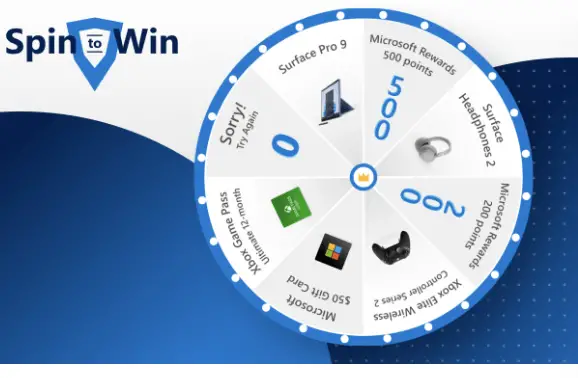
Are you a fan of Microsoft products and services? Then, have you heard about the Microsoft Rewards program? This loyalty program allows users to earn points by doing simple tasks like searching on Bing or shopping at the Windows Store. These points can be redeemed for various rewards such as gift cards, sweepstakes entries, and even Xbox Game Pass subscriptions. But how can you maximize your rewards and earn more points? In this blog post, we will share some tips and tricks that can help you get the most out of your Microsoft Rewards experience. So sit back, relax, and let’s dive into the world of free points!
What is Microsoft Rewards?
Microsoft Rewards is a loyalty program that allows users to earn points by performing various activities on Microsoft products and services. These activities include searching on Bing, shopping at the Windows Store, completing quizzes, and participating in surveys.
The program was launched in 2016 as Bing Rewards but was later rebranded to Microsoft Rewards to incorporate other products like Xbox and Office 365. The main goal of the program is to encourage more user engagement with Microsoft’s digital offerings while rewarding them for their loyalty.
Users can redeem their earned points for different rewards such as gift cards, sweepstakes entries, or even donations to charity organizations. Additionally, frequent users can unlock tiered membership levels that offer additional perks such as bonus points and exclusive discounts.
Microsoft Rewards is an excellent way for loyal customers to get rewarded for using Microsoft’s products and services regularly. By engaging in simple tasks like searching on Bing or shopping at the Windows store, you can earn free points that can be redeemed for exciting rewards!
How to Earn Points on Microsoft Rewards
Earning points on Microsoft Rewards is easy and fun. There are many ways to earn points, and each one will bring you closer to your reward goal.
Firstly, when you use Bing as your default search engine, you can earn up to 5 points for every search query. It’s a simple way of earning points without doing anything extra.
Another way to earn points is through daily sets. These sets consist of quizzes and polls that test your knowledge about various topics. Completing the daily set will give you bonus points that accumulate over time.
If you have an Xbox console or subscribe to Xbox Game Pass Ultimate, there are exclusive quests available that allow players to earn additional points by completing in-game challenges or exploring new games available on the platform.
Participating in special promotions and events also provides opportunities for earning more rewards like sweepstakes entries or bonus point offers.
There are plenty of ways to rack up those Microsoft Rewards Points quickly – just remember consistency is key!
The Different Ways to Spend Your Points
Once you’ve earned enough points on Microsoft Rewards, it’s time to start thinking about how to spend them. Thankfully, the program offers a variety of options for redeeming your hard-earned rewards.
One popular way to use your points is by purchasing Microsoft products such as Xbox games, Surface devices or even Windows Store apps. This can be a great option if you’re in need of new tech gear or simply want to upgrade your existing setup.
If tech isn’t quite what you’re after, consider donating your points to charity instead. Through the “Give with Bing” feature, users can donate their rewards directly to various organizations such as Boys & Girls Clubs of America and Teach For America.
Another unique option is using your points towards sweepstakes entries for chances at winning big prizes like trips and experiences. While not guaranteed, this can add an exciting element of chance into using your rewards.
Consider using your rewards towards subscription services like Xbox Game Pass Ultimate or Groove Music Pass. This allows you continued access to exclusive content while maximizing the value of your earned points.
There are plenty of ways to spend those valuable Microsoft Rewards Points – so choose wisely!
Tips and Tricks for Maximizing Your Rewards
There are many ways to earn points on Microsoft Rewards, but there are also some tips and tricks that can help you maximize your rewards even further. Here are a few:
First, make sure you’re using Microsoft Edge as your browser. You’ll get bonus points just for searching with it.
Second, take advantage of the daily quizzes and offers. These can earn you a good amount of points each day.
Third, consider signing up for Xbox Game Pass Ultimate if you’re an Xbox player. This subscription not only gives you access to hundreds of games, but also comes with extra rewards points every month.
Fourth, keep an eye out for special promotions and events that offer bonus points for certain activities or purchases.
Don’t forget about the sweepstakes! While they may not guarantee a win, entering them regularly could eventually pay off big time.
By following these tips and tricks (and being patient!), you’ll be well on your way to maximizing your rewards on the Microsoft Rewards program.
Use Your Points To Play Instant Win Games
Microsoft Rewards International Instant Win #10
Start Date & Time: April 17, 2023, at 9:00:00 AM Pacific Time (“PT”)
End Date & Time: July 31, 2023, at 9:00:00 AM PT for Game Plays received through point redemption. For requests by mail, requests must be postmarked by July 31, 2023, and received by August 8, 2023. The Promotion will remain open until August 11, 2023, at 11:59:59 PM PT for entrants participating in the Promotion via their free email link.
Eligibility: Legal residents of the 50 United States, Washington, D.C., the United Kingdom, Canada, or Japan, who are at least 18 years old, have a valid email address, and are members of the free Microsoft Rewards Program.
Entry Limit: One (1) Game Play per Microsoft Rewards Account. Additional opportunities to receive a Game Play may be offered by Sponsor from time to time.
Prizes: Prizes/awards of points are randomly time seeded throughout the Promotion Period and awarded to the person who plays on or after the time the prize/award of points is randomly seeded.
To enter the Microsoft Rewards International Instant Win #10 Promotion, follow these steps:
- Visit www.microsoft.com/rewards and create a Microsoft Rewards account (if you don’t have one already). Creating an account is free of charge.
- Go to the Microsoft Rewards redeem page and select the option to redeem 200 Microsoft Rewards points for a game play in the Promotion. This will enter you into the Promotion for the corresponding Entry Period.
- Provide your true first and last name, mailing address, working phone number, and email address, as well as read and agree to the Official Rules.
- You will receive one Game Play after successfully redeeming your points.
- If you are selected as a Potential Winner, you will receive a Play Receipt with a unique Security Identification Code (SIC) sent to the email address provided in the registration process.
Conclusion
The Microsoft Rewards program is an excellent way to earn free points and redeem them for exciting rewards. By following the tips and tricks outlined in this article, you can maximize your earning potential and get more out of the program.
Remember to take advantage of all the different ways to earn points, from completing quizzes and surveys to shopping through Microsoft Edge. Be sure to set a goal for your rewards so that you stay motivated along the way.
Don’t forget that patience pays off when it comes to earning enough points for big-ticket items like gift cards or subscriptions. Keep at it consistently over time, and before long, you’ll be enjoying all sorts of great benefits thanks to your participation in Microsoft Rewards!
Keep going