How to Score a Free Movie with Microsoft Rewards
Free Movie Alert: How to Score a Blockbuster Hit with Microsoft Rewards
Who doesn’t love free entertainment? In a world where streaming subscription prices seem to hike up every other month, finding a legitimate way to own a movie digitally for free is like finding a needle in a haystack. But right now, Microsoft is handing out that needle on a silver platter.
If you have a Microsoft account (Hotmail, Outlook, Live, or Xbox), you likely have access to one of the most generous rewards programs on the internet: Microsoft Rewards. Currently, they are running a specific promotion usually titled “Movie Night’s On Us” or the “Free Movie Punch Card.”
This isn’t a rental. This isn’t a “free trial” that you have to cancel later. This is a digital license for a major motion picture that you can keep in your library forever. Whether you are a die-hard film buff, a parent looking for a family night flick, or just someone who loves a good deal, this guide covers absolutely everything you need to know about claiming your free movie before the January 2026 deadline.
- How to locate the hidden punch card.
- A step-by-step walkthrough to unlock the reward.
- A detailed look at the movies available (and which one you should pick).
- Common troubleshooting tips if the offer isn’t tracking.
- How to earn even more free stuff with Microsoft Rewards.
Part 1: The “Movie Night’s On Us” Offer Explained
Microsoft frequently runs “Punch Cards” on their rewards dashboard. These are limited-time activities where you must complete a set of tasks—usually sequential—to unlock a bonus. Sometimes the bonus is extra points (which convert to gift cards), but in this rare instance, the bonus is a direct product: a full feature film.
The beauty of this specific promotion is the low barrier to entry. Unlike other offers that might require you to buy a game or subscribe to a service, this punch card is usually based on engagement. Microsoft wants you to use their search engine, Bing, and in return, they are willing to pay you in entertainment.
The Requirements
While specific terms can vary slightly by region, the standard requirement for the “Movie Night” punch card is incredibly simple:
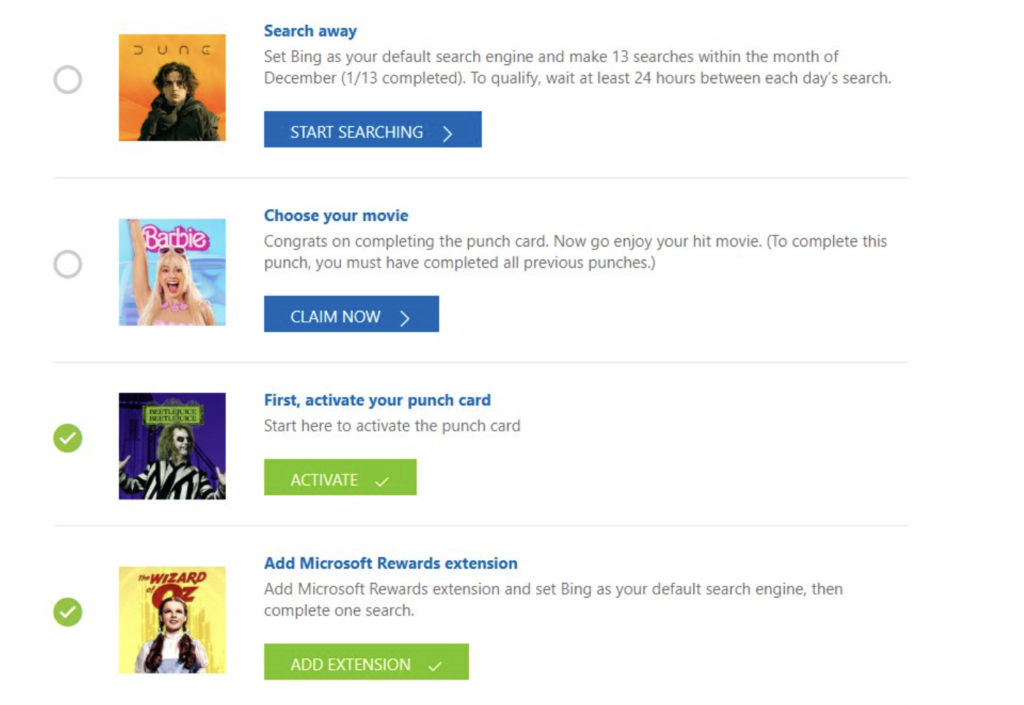
- Activate the card: You must click a button to acknowledge you are starting the challenge.
- The Search Challenge: You are usually required to perform searches on Bing for a set number of days consecutively or within the promotional period. A common requirement is searching on Bing for 5 separate days.
- The Redemption: Once the “punches” are complete, you receive a redemption code or a direct link to claim your film.
Part 2: Step-by-Step Guide to Claiming Your Movie
Ready to get your freebie? Follow these steps precisely to ensure the system tracks your progress correctly.
Step 1: Access the Dashboard
First, ensure you are logged into your personal Microsoft account. Navigate to the Microsoft Rewards Dashboard. You can do this on a desktop browser (Edge, Chrome, etc.) or via your mobile phone.
Pro Tip: If you are an Xbox gamer, you can also find this in the “Microsoft Rewards” app on your console, which often has a more visual layout.
Step 2: Locate the Punch Card
Scroll down past your “Daily Set.” Look for a section often labeled “More Activities” or a dedicated banner for “Featured Offers.” You are looking for a tile that explicitly mentions “Free Movie” or “Movie Night.”
If you do not see it immediately, don’t panic. Microsoft rolls these offers out to different users at different times. However, if you have seen the marketing for it, it should be there. Try refreshing or checking the “Earn” tab.
Step 3: Activate and Complete
Click on the tile. You will see a layout of “punches.” The first punch is almost always “Activate Punch Card.” Click it. If you don’t click this first, none of your subsequent searches will count.
Once activated, proceed to do your searches. If the requirement is “Search on Bing for 5 days,” do a few searches right now. You should see the counter move to “1/5” or “Day 1 Complete” within a few minutes. Set a reminder on your phone to come back for the next 4 days.
Part 3: The Movie Selection – What Can You Get?
The selection for this promotion is surprisingly robust. Microsoft hasn’t just thrown in “B-movies” from the bargain bin; they have included recent blockbusters, 4K UHD titles, and massive cultural hits. Here is a breakdown of the top choices available in this offer, to help you decide which one is worth your punch card.
Genre: Comedy / Fantasy
The Vibe: Colorful, smart, and culturally significant.
Why pick this? If you missed the “Barbenheimer” craze, this is your chance to own the biggest movie of 2023. Margot Robbie and Ryan Gosling are perfection in this film. It’s not just a toy commercial; it’s a surprisingly deep, hilarious, and visually stunning satire on gender roles and corporate culture. Plus, the visuals pop incredibly well in high definition.
Genre: Sci-Fi / Epic
The Vibe: Massive scale, intense, cinematic masterpiece.
Why pick this? With the recent release of Part Two, owning Part One is essential. This is the definition of an “event” movie. Directed by Denis Villeneuve, it adapts the “unfilmable” book into a sensory experience. If you have a good sound system or a 4K TV, this is the tech demo movie you want to own. It feels expensive, because it is.
Genre: Musical / Fantasy
The Vibe: Whimsical, heartwarming, and sweet.
Why pick this? A perfect pick for families. Timothée Chalamet brings a charming, lighter energy to the character compared to the darker Gene Wilder or Johnny Depp iterations. It’s a prequel that stands on its own with catchy songs and that classic Roald Dahl magic. Great for a cozy movie night.
Genre: Horror / Comedy
The Vibe: Spooky, nostalgic, and chaotic fun.
Why pick this? The legacy sequel that actually works. If you grew up with the original, seeing Michael Keaton back in the stripes is pure dopamine. It retains the practical effects and stop-motion charm of the original while updating the story for a modern audience.
Genre: Classic
The Vibe: Timeless comfort food.
Why pick this? Sometimes you don’t want the new flashy thing; you want the movie you can watch every year. The Wizard of Oz is a staple of cinema history. A Christmas Story is a holiday mandatory viewing. Owning these digitally means you never have to hunt for them on streaming services when the holidays roll around.
Part 4: Important Troubleshooting
Technology isn’t perfect, and sometimes Microsoft Rewards punch cards can be glitchy. Here is how to fix common issues:
“My searches aren’t tracking!”
This is the #1 complaint. If you searched on Bing but the day didn’t check off:
- Check your login: Ensure the browser you are searching on is actually logged into the same account as the dashboard.
- Wait 15 minutes: There is often a delay between the search server and the rewards server.
- Try a different device: If searching on your phone didn’t work, try a desktop PC, or vice versa.
- Don’t spam: Searching for “A”, then “B”, then “C” in rapid succession sometimes triggers a spam filter. Try searching for legitimate sentences.
“I completed the card, but where is my code?”
Once the card shows “Completed,” you usually need to click the final button on the card itself to generate the code. This code is then either automatically applied to your account, or you are given a 25-character key to redeem at redeem.microsoft.com. Check your email associated with the account as well; they often send a backup confirmation there.
Part 5: Beyond the Movie – Mastering Microsoft Rewards
If you are new to Microsoft Rewards, this free movie is just the tip of the iceberg. You are sitting on a goldmine of potential free gift cards (Amazon, Starbucks, Target, etc.). Here is a crash course on how to keep the freebies coming after you’ve watched your movie.
The Daily Set
Every day, the dashboard offers a “Daily Set” of three activities. These are usually a quick poll, a quiz, and a click-through link. Completing them takes less than 2 minutes and keeps your “Streak” alive. Higher streaks grant bonus points.
Search Points
You can earn points just for using Bing instead of Google.
Level 2 Users (Active Users) can earn:
- 150 Points for PC Searches per day
- 100 Points for Mobile Searches per day
- 20 Points for using the Microsoft Edge browser
That is roughly 270 points a day just for searching. That adds up to roughly 8,000+ points a month, which is nearly enough for a $10 gift card every single month, for doing nothing but browsing the web.
Xbox Game Pass Quests
If you play games on Xbox or PC, check the “Game Pass Quests.” You can earn points for playing specific games, unlocking achievements, or simply launching the Xbox app on your phone. It is passive income for gamers.
Part 6: Frequently Asked Questions (FAQ)
Q: Do I need to enter a credit card to claim the free movie?
A: Generally, no. If you are redeeming a code, it simply adds the license to your library. However, if the redemption method processes through the Microsoft Store as a “100% off” purchase, you might need a payment method on file, though it will not be charged.
Q: Will the movie disappear after I watch it?
A: No! This punch card offers a “Buy” license, not a “Rent” license. It stays in your Microsoft Movies & TV library indefinitely.
Q: Can I watch the movie on my iPhone or Android?
A: Yes, but you need the right app. You cannot watch it directly in the Apple TV app or Google Play. You will need to download the Microsoft Movies & TV app (if available) or, more likely, link your account to Movies Anywhere.
Most of the movies on this list (like Barbie and Dune) are compatible with Movies Anywhere. If you create a free Movies Anywhere account and link your Microsoft account to it, the movie you claim here will automatically appear in your Apple TV, Amazon Prime Video, Vudu, and Google Play libraries. This effectively frees your movie from the Microsoft ecosystem!
Conclusion
The “Movie Night’s On Us” promotion is one of the best value-per-effort deals available in the digital space right now. For roughly 5 minutes of effort spread over a few days, you get a premium, high-definition film that would otherwise cost you $15 to $20 to purchase.
Remember, the clock is ticking. You have until January 31, 2026, to complete the punch card. Don’t leave it until the last minute—glitches happen, and you don’t want to miss out on watching Dune or Barbie for free because of a technical error on the final day.
So, head over to your dashboard, start your searches, and get the popcorn ready. The movie is on Microsoft.
Helpful Freebie Mom Guides
Keep going